BIDS Manager is a multimodal raw-to-BIDS conversion and curation
tool. It covers the full workflow for MRI, PET, EEG, MEG and
the physiological recordings stored inside MRI DICOM files, in a
single application, with the official BIDS schema as the source of
truth for naming, structure and validation.
It does the conversion, and it puts you in control of how the
conversion happens. The established engines write the files; BIDS
Manager decides what each one is asked to do, one recording at a
time, from a table you can read and change. Used on their own, those
engines take their instructions from command-line flags and
configuration files written before you know what is in the folder.
Here you make the same decisions after looking at it, and you can see
the result of each one before anything is written.
Around the conversion it does the rest of the job. Working out what a
raw folder actually contains. Deciding what belongs in the dataset and
what each file should be called. Collecting metadata that is scattered
between file headers, a dose sheet on a desk, and the memory of
whoever ran the session. Then checking that what came out is what you
intended.
▸
Everything arrives in one installation.
The conversion and defacing engines, the validator and the
viewers are installed with the application, on macOS, Linux and
Windows.
There is no separate toolchain to assemble and no compiler to
set up. See Installation.
Foundations
The engines underneath
Converting a scanner file, and removing the face from a head scan,
are both solved problems. BIDS Manager does not solve either again.
It uses the established tool for each job and extends it with the
work that tool was never meant to cover.
dcm2niix
converts MRI and PET DICOM series into NIfTI images.
mne-bids
writes EEG and MEG recordings into the BIDS layout, and
fNIRS recordings where the channels identify them as such.
pet2bids
reads ECAT7 scanner headers and PMOD blood curves. It is the
reference implementation for the PET part of the standard.
bidsphysio
decodes the physiological signals that Siemens MRI scanners record
alongside an image and store inside the DICOM files: respiration,
ECG and pulse oximetry.
niimath
removes the face from anatomical and PET images, by registering a
mask from the avg152T1 atlas and
blanking what it covers. The same operation with a brain mask is
the atlas skull-strip engine. The template and mask pair comes
from
niivue/deface.
brainchop
runs the
mindgrab
brain-extraction network, which finds the brain in an image
directly rather than fitting an average one to it. It runs on
tinygrad,
so it needs no PyTorch and no ONNX runtime.
All six are installed with BIDS Manager. The dcm2niix and niimath
binaries are included, MNE, pet2bids and brainchop arrive as
dependencies, and bidsphysio is built in. There is no separate
installation step for any of them, on any platform. The single
exception is niimath on Python 3.14, which has no wheel for it yet:
BIDS Manager installs and runs, and the defacing entry greys out
with a tooltip saying why.
Defacing follows the same principle as conversion: these are
established, openly licensed tools, and reimplementing either would
only mean a second implementation to be wrong in its own way. What
BIDS Manager adds around them is the preview, the reversibility and
the before-and-after viewer.
You decide what each engine does, after you have seen the data
Each engine is normally given its instructions up front, through
command-line flags or a configuration file, and you find out what it
decided afterwards. BIDS Manager turns that around. It shows you every
recording it found, you say what each one is and what it should be
called, and only then are the engines run, on exactly what you chose.
The settings that usually live in flags are here too, as things you
can see and change: whether a recording is converted at all, how many
run in parallel, what happens when a subject already exists, whether
the extra single-volume copies dcm2niix produces are kept, whether
recordings are re-encoded to a format BIDS accepts. Rules you write
once, for the way your own site names its sequences, are applied to
every scan from then on.
The rest of the job
What BIDS Manager adds around them
Each engine does one job well and stops there, by design. Six named
steps make up the rest, and they are what this application is for.
They run in order, and each one leaves
something you can read.
Step 1
Inventory
Every file in the raw folder is opened and its header read, then
listed as one row per recording: which subject, which session,
which sequence, how many files, and the name it will carry in
BIDS. Nothing has to be sorted or renamed first, and a folder of
mixed modalities produces one list.
Step 2
Curation
You read that list and change it: leave out the localisers and
the run that was aborted, correct a task name, separate two subjects
that were wrongly merged. Nothing is
converted, moved or written to disk until you press Run.
Step 3
Overwrite protection
Every destination filename is worked out before conversion
starts. Genuine repeats are numbered; anything still sharing a
name is shown in red and the conversion refuses to run. Without
this, one recording silently replaces another and both the
conversion and the validator report success.
Step 4
Enrichment
What is already inside your files is written into the metadata for
you: acquisition parameters, channel counts, sampling rates,
frame timing and units. So are the facts that span files, such as
which images a fieldmap corrects and which channel is really an
EOG rather than an EEG.
Step 5
Metadata templates
Some of what BIDS requires is in no file anywhere. The injected
dose for a PET scan is on a dose sheet; the reference electrode
for an EEG recording was chosen by whoever set up the cap. A
template asks each question once for every file of its kind, and
any answer can be overridden for a single recording that differs.
Step 6
Validation
The dataset is checked against the standard without installing
anything else, and every finding names the rule it came from.
Images, recordings, sidecars and tables all open in the
application, so a problem can be fixed where it was found.
More on validation below.
BIDS Manager is also project-first. You begin by
creating or opening a dataset project, and from then on every scan,
edit and decision is saved into it. Each scan is kept as a versioned
snapshot, and every edit is undoable. Curation carries across sessions,
so you can stop half way and come back to it. Re-running a conversion
safely merges in new subjects and sessions rather than overwriting
what is already there.
Motivation
Why it exists
Raw datasets are rarely as clean as a conversion assumes. Real
sessions accumulate complications:
DICOM files from one subject land in another subject's folder.
An interrupted run leaves residual volumes behind.
A bad scan is repeated on the spot, and both attempts stay in the same folder.
Calibration scans, localisers and scanner reports sit among the acquisitions of interest.
Naming drifts because the protocol changed mid-study.
A session is missing a run, or carries one extra.
Most conversion tools ask you to declare what is in the folder before
they start, through a heuristic file or a configuration that encodes
the expected structure: this acquisition is the T1w, this one is the
resting-state BOLD, ignore the localisers. That design assumes you
know exactly what happened in every session and every run.
The assumption is fragile. People routinely work with data they did
not acquire: a colleague's project, a multi-site dataset, an archive
from someone who has left. Even when you were the operator, months
later the memory of restarting run 02 because the subject moved is
gone. When the data does not match the configuration, the conversion
mislabels rows, skips legitimate acquisitions, or produces an output
that is structurally valid and wrong about what each file contains.
BIDS Manager starts from the other end. Before converting anything it
reads the raw folder and presents every acquisition as it actually
exists on disk: subject, session, run, modality, file count, scanner
timestamps, image type, sequence parameters. Mixed subjects appear as
separate rows. Residual volumes show their reduced file counts.
Repeated sequences are listed side by side with the timestamps that
let you pick the right take. Calibration and localiser series are
marked for skipping, and you confirm every decision before anything
is written.
What is converted is then what you saw and chose, rather than what a
configuration file assumed.
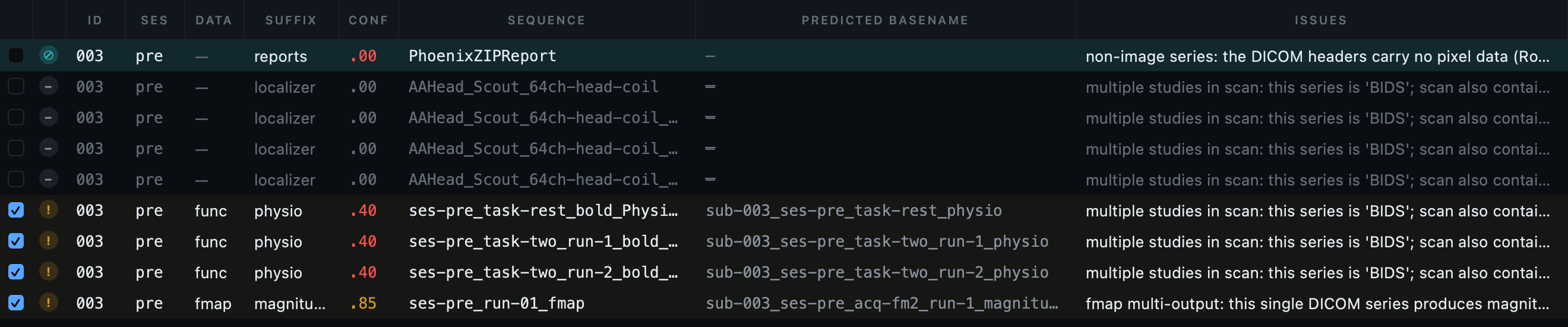
Nothing disappears quietly. The teal row is an object
with no image data inside it at all, a scanner report, which no
converter can turn into anything. The dimmed rows are localisers set
aside automatically. Every one carries its reason in the issues column,
and any of them can be put back with a click. A tool that simply
skipped them would leave you unable to tell an excluded file from a
missing one.
The hard part
The failures you do not notice
A conversion that crashes is an inconvenience, and you fix it. The
costly ones are the conversions that succeed, produce a dataset that
looks correct, and are wrong. Every failure below is real and every
one is silent by default. They are grouped by where they happen: the
first group to any modality, then the three that are particular to
MRI, to electrophysiology and to PET, and a last group that happens
later, when a finished dataset is changed.
Whatever you are converting
Overwritten
Two recordings, one filename
Two recordings resolve to the same BIDS filename, and the second
is written over the first. Nothing reports it: the conversion
succeeds, the validator passes, and one scan is simply missing.
You find out when the analysis has one subject fewer than your
spreadsheet.
BIDS Manager works out the destination filename of every row
before converting anything, gives genuine repeats a
run number where the standard allows
one, shows the rest in red, and refuses to convert until they are
resolved.
Caught before anything is written. The three red rows
resolve to one filename with nothing to tell them apart, so the
conversion refuses to start. The two below them were duplicates that a
run number resolves, so they were separated
automatically.
Invisible
A folder BIDS never reads
A datatype folder is mistyped, anatt
instead of anat, or a well-meant
raw folder is created inside a
subject. The files inside can have perfect BIDS names. No BIDS
tool will ever read them, because tools look inside the datatype
folders. Most validators say nothing, because each filename is
valid when examined on its own.
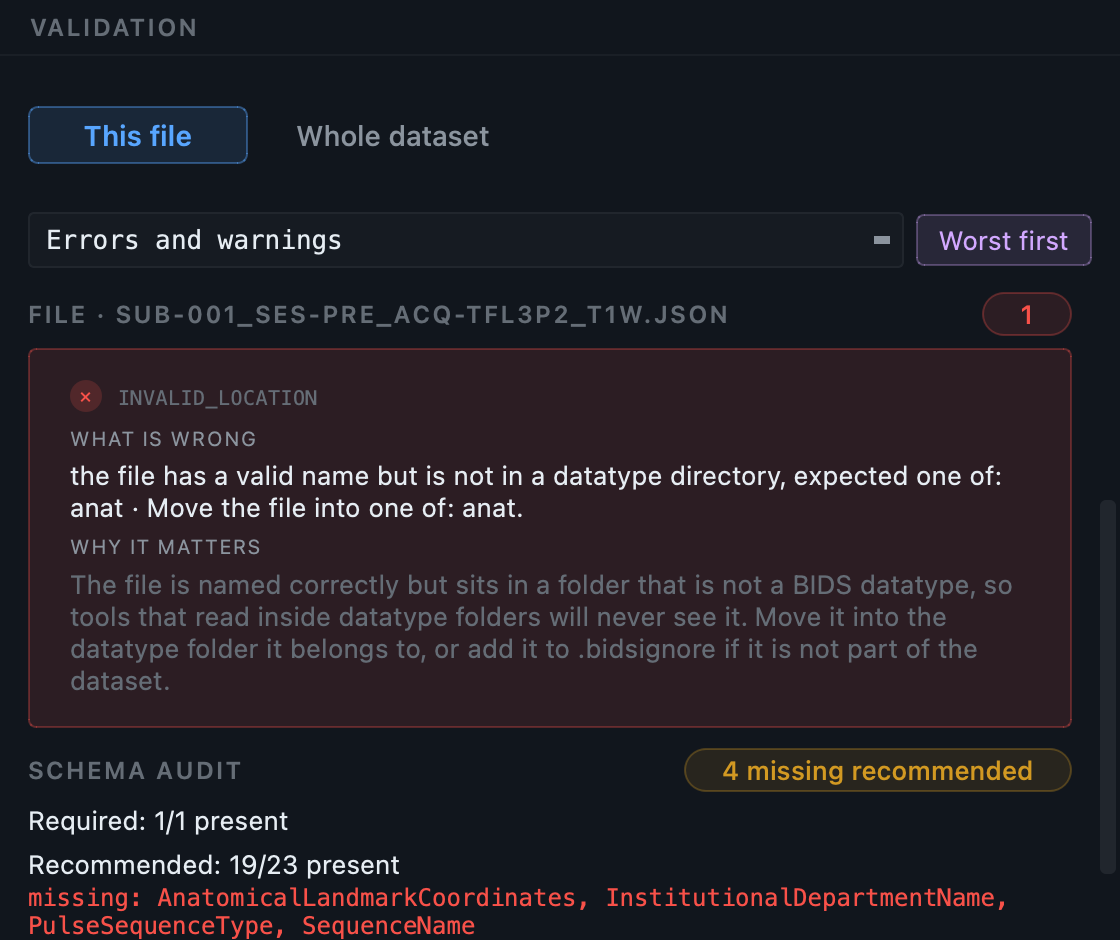
BIDS Manager reports it as an error and names the folder.
What it looks like when reported. The folder line
reads ANATT, and the message says the file
has a valid name but is not in a datatype directory, then lists what it
should be. Every filename inside that folder is still correct, which is
exactly why checking one name at a time says nothing.
Split apart
One participant, three identities
Every modality states who was scanned in its own way. MRI and PET
carry a patient identifier in the DICOM header; EEG and MEG carry
nothing, so the answer has to come from the folder. Scan a visit
where somebody had all four and you get several subjects where
there was one person, each holding part of the session.
BIDS Manager puts every recording in one table with the subject it
worked out, so a disagreement is visible before conversion and is
fixed by editing a column.
Shared anyway
A deidentified dataset with the faces still in it
Removing names and dates from the sidecars feels like the job is
done, and every validator agrees. But a T1w contains enough of
the face to render a recognisable portrait, and nothing in the
dataset says so. The metadata is clean, the imaging is not, and
the failure only surfaces once the data is somewhere you cannot
take it back from.
BIDS Manager can remove faces during the conversion itself, so
the identifiable image never enters the dataset, and shows you
the before and after side by side so you can confirm that the
face went and the brain did not.
How defacing works.
MRI
Unusable
Fieldmaps that point at nothing
A fieldmap without IntendedFor is
valid BIDS and useless: no pipeline can tell which images it is
meant to correct.
BIDS Manager fills it in from what the scan measured.
False alarm
Objects that cannot be converted at all
A Siemens TENSOR map or a
PhoenixZIPReport contains no image
pixels. dcm2niix cannot convert it and returns an error, which
looks exactly like a failed conversion of something that mattered.
BIDS Manager detects that there is no image inside, marks the row
and excludes it with the reason shown, so a real failure is never
lost among expected ones.
Phantom runs
Derived copies that look like extra data
dcm2niix can split one series into the real image plus several
single-volume derivatives, named
_bolda,
_Eq_,
_ROI or
_i<instance>. They are valid
NIfTI files with valid names. Left in place they inflate the run
count and can be picked up by a pipeline as if they were
acquisitions.
BIDS Manager drops them by default and tells you how many, with a
setting to keep them. Genuine multi-output series, fieldmap
pairs, complex data and DWI derivatives, are untouched.
EEG and MEG
Answered falsely
Metadata that looks answered and is not
BIDS requires EEGReference and
EEGGround in every EEG sidecar. A
converter cannot know them, so it writes
"n/a". The field is present, the
validator is satisfied, and the file now states something false
about your recording.
BIDS Manager treats n/a as a question
nobody has answered yet, and asks you once for the whole study.
Mistyped
An ECG trace filed as a brain channel
An amplifier records the heart, the eyes and the stimulus trigger
on the same connector as the scalp, and the file format has no way
to say which is which. Everything therefore arrives typed as EEG.
An analysis that averages across channel type is then averaging a
heartbeat into the data.
BIDS Manager lets you say once which channels are which, and
rewrites their type in channels.tsv
for every recording in the study. The types it accepts come from
the schema, not from a list somebody typed out.
Overwritten
A device the converter already identified
A study-wide answer applied without checking will overwrite the
manufacturer that mne-bids read out of a MEG file, replacing a
fact from the recording with a guess from a form.
BIDS Manager offers what it detected as a suggestion and writes it
only where you accepted it, so a value the file already knew is
never quietly replaced.
PET
Wrong by decades
A scanner clock that says 1936
TimeZero is the instant every frame
time and every blood sample is measured against. One of the
published OpenNeuroPET phantom files records a scan start before
the epoch, which renders as a plausible-looking time of day in
1936. Deriving TimeZero from it
produces a dataset in which every time is wrong.
BIDS Manager refuses to derive it from an impossible value and
asks you for it instead.
Drifting
Frame timing that drifts through a batch
Converting a folder of ECAT files can leave the second file with
two frame times and the third with three, when one metadata
template is reused between files. The images are right, the
timing is wrong, and no validator checks for it.
BIDS Manager gives every file its own metadata, so the tenth file
is as correct as the first.
Not in the file
Required numbers no scanner records
Injected dose, injected mass, specific activity, mode of
administration. BIDS requires them. They are on the dose sheet,
not in the file. A tool that reads only files cannot help, so it
leaves them blank or writes a placeholder.
BIDS Manager asks for them once per study, with the standard's
own description beside each box, and can read them from your
lab's own dose spreadsheet.
Orphaned
A blood table its own sidecar cannot describe
BIDS separates hand-drawn and autosampled blood with a
recording entity in the filename, and
requires it on the sidecar as well as the table. A converter that
puts it on one and not the other produces a pair no tool can
match up, and the table is read without the units and flags that
describe it.
BIDS Manager names the sidecar for the sampling it belongs to, so
each table has a sidecar that can be found from its own name.
After conversion, when you change something
Left behind
A table still listing a file that moved
Rename a task, put a datatype into a session, delete a pilot run.
The files change; the things that named them do not. The
*_scans.tsv row still lists the old
path, the IntendedFor entry on a
fieldmap still points at the old image, the
participants.tsv row is still there
for a subject who is not. Every filename left in the dataset is
valid, so the dataset passes, and the fieldmap is simply never
applied to anything.
BIDS Manager treats the reference as part of the operation rather
than as follow-up work. Renaming, restructuring and deleting each
repair the scans tables, the sidecar fields the standard defines
as holding a path, the participants and sessions rows, and the
folders left empty, as one step that can be undone as one step.
Contradicted
A task name that no longer matches its own label
TaskName inside the sidecar is
supposed to be the readable form of the
task- label in the filename. Rename
the label and the sidecar keeps the old name, so the file says
one thing and the folder says another. No validator compares the
two, and the wrong one is the one most analysis code reads.
BIDS Manager follows the rename into the sidecar, but only when
the value there really does derive from the old label. A
TaskName somebody wrote by hand is
left alone rather than overwritten with a guess.
Half-rewritten
A link whose folder and filename disagree
The standard lets one file point at another with a URI such as
bids::sub-001/anat/sub-001_T1w.nii.gz,
where the subject appears twice, once as a folder and once inside
the name. Rename the subject and a tool that rewrites only the
part it recognises leaves a link whose two halves name different
people. It resolves to nothing, and it is not reported.
BIDS Manager reads the link as a path rather than as text, so
both halves are rewritten together, in all three of the spellings
BIDS uses for pointing at a file.
Side by side
What a converter alone leaves undone
Most raw-to-BIDS tools are converters: give them a folder and a
configuration, and they write BIDS. BIDS Manager uses the best of
those converters rather than writing another one, and covers what
lies on either side of them.
A converter alone
BIDS Manager
Knowing what is in the folder
You declare it up front
It reads inside every file and shows you
Two files with one name
The last one wins, silently
Conversion refuses and names both files
A folder that is not a datatype
Usually unreported
Reported as an error, with the folder named
Metadata no file contains
Blank, or a placeholder
Asked once per study, in the standard's own words
Metadata that differs per run
One value for everything
A dataset default, with per-recording overrides
Validation
A separate tool, separately installed
Included, on the same schema, citing the rule
Reviewing the result
Open other software
Sidecar forms, TSV tables, NIfTI in 2-D, 3-D and time series, and a MEG / EEG signal viewer
Picking the work up again
Start over
Versioned scans, saved edits, undo
An engine that fails on one file
The run fails
The failure is contained, the rest still converts
The last row matters more than it appears to. Real archives contain
files that break tools. A conversion that stops at the first
difficult file turns a morning's work into a week's.
Validation
Validation is part of the application
Validation is not a separate tool to install and run afterwards. It
reads the same BIDS schema the rest of the application reads, so what
it checks and what the metadata forms ask for cannot disagree. It
runs on a whole dataset, a folder or a single file, and it runs while
you edit, so a correction turns a finding green without leaving the
window.
Every finding states three things: what is wrong, how to fix it, and
which rule of the BIDS schema it comes from. The last of those is
what makes a finding checkable. A rule path such as
rules.sidecars.mri.MRIHardware points at
the part of the standard the requirement is drawn from, so you can
read it and judge the finding yourself.
Findings point at the field or the table column they concern, and a
button takes you to it. Deep checks additionally open the NIfTI image
headers, which catches a truncated or corrupt image that is otherwise
indistinguishable from a healthy one.
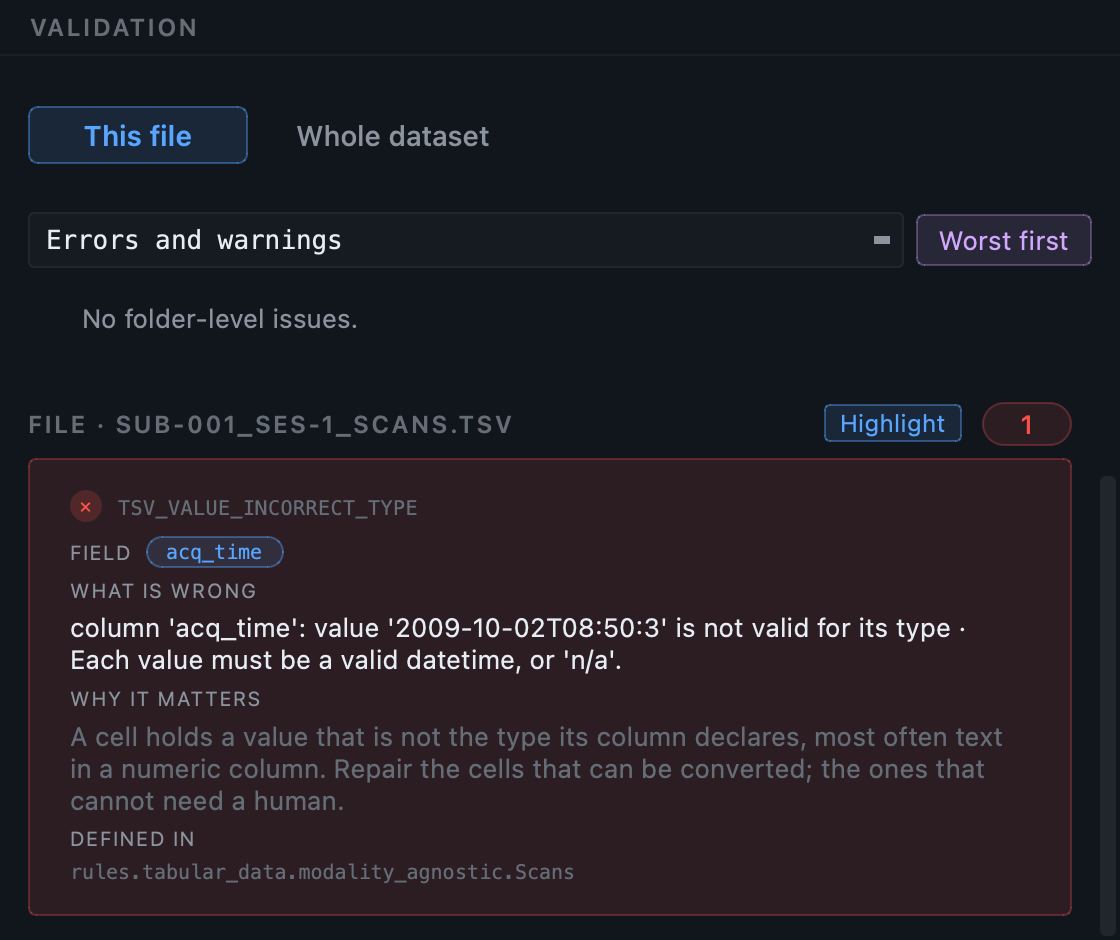
A finding, in full. What is wrong, how to fix it, the
field it concerns, and the rule in the BIDS schema the requirement is
drawn from. This one is not a naming problem: it is a value inside a
table that is the wrong type, which no check on filenames could ever
see.
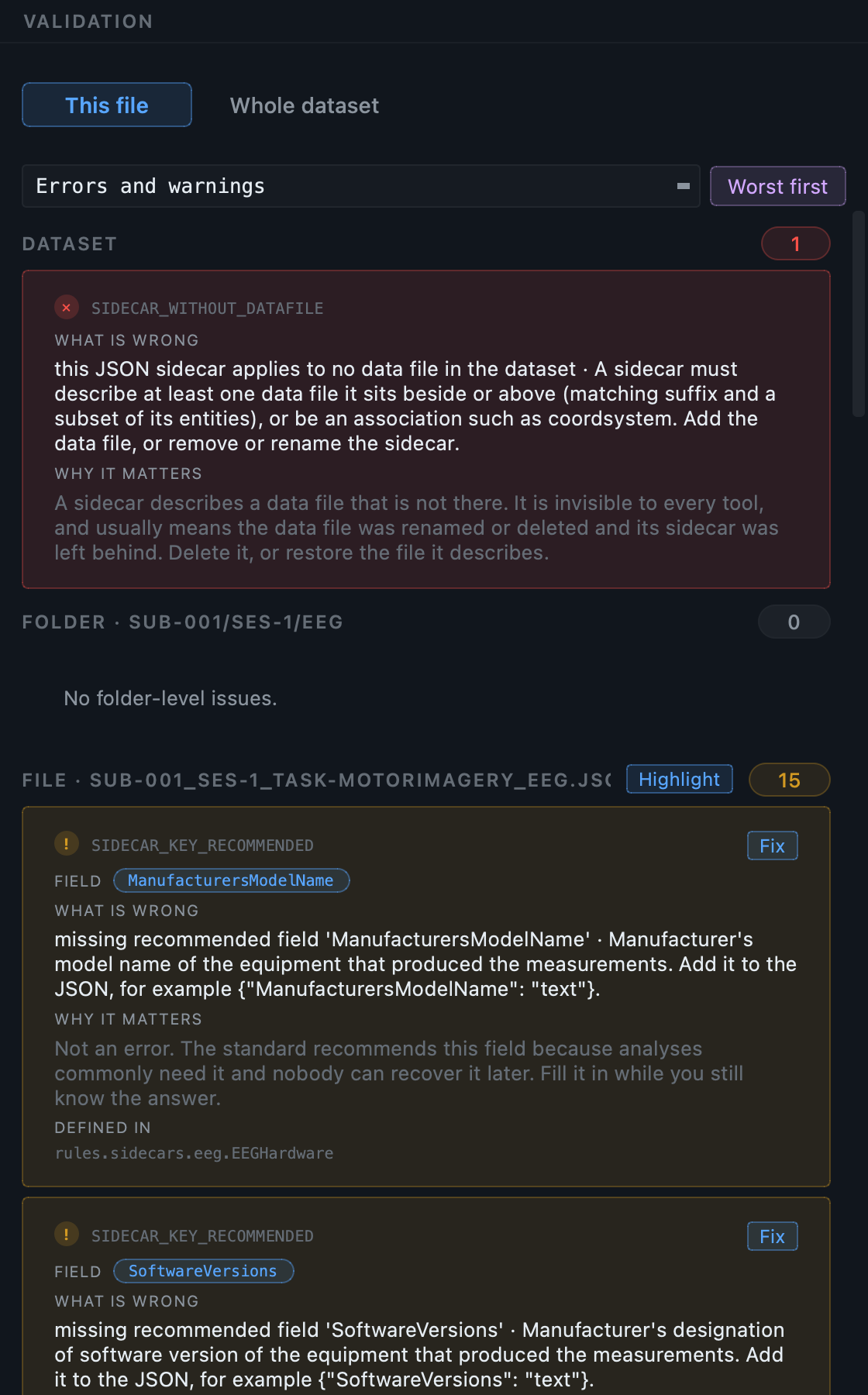
Three scopes, always visible. Every finding is
about the dataset as a whole, about the folder you are in, or about
the file you have selected, and each section carries its own count.
Nearly everything lands on a file, which is what makes the top
section worth reading when it is not zero: here a sidecar describes
a data file that is not in the dataset, which belongs to no single
file and would have nowhere else to appear.
▸
The validator is also available on its own.
The checks are implemented in
bidsval,
a separate open-source package, so the same validation can be
used in a pipeline that has nothing to do with this application.
BIDS Manager depends on it in the ordinary way.
Interfaces
Two ways to drive it
The graphical interface presents the decisions
visually, with an editable inventory table, an inspection view, and
viewers for NIfTI images, MEG and EEG signals, JSON sidecars and TSV
tables.
The command line offers seven console scripts
(bidsmgr-create,
bidsmgr-scan,
bidsmgr-rebuild,
bidsmgr-convert,
bidsmgr-metadata,
bidsmgr-validate,
bidsmgr-project) for scripted, headless
or pipeline use.
Both drive the same engine. A scan run from the command line produces
the inventory the graphical interface populates, and an edit made in
the interface can be replayed from the command line.
Privacy
Your data stays on your machine
BIDS Manager runs entirely on your computer. Your images, your
recordings and your participant information are read from your disk
and written back to your disk. Nothing is uploaded, there is no
account, there is no cloud service, and the application works with
the network switched off.
The application contains no analytics and no telemetry. It does not
report what you convert, how often you use it, or that you use it at
all.
▸
Telemetry in dependencies is switched off as well.
pet2bids reports usage by default. BIDS Manager disables that
before loading it, because you chose this application and cannot
reasonably consent on behalf of a dependency you did not know you
were installing.
One feature uses the network, and only one: on request, BIDS Manager
asks pypi.org for the latest published version number so it can tell
you an update exists. That request carries nothing about you or your
data, and it is the same request pip
makes.
How it works
Eight stages, three views.
The workflow runs in eight stages that alternate between
user-driven and engine-driven steps:
Raw is the input folder, untouched.
Scan walks it and reads the metadata inside every
file. Curate is where you review the inventory and
decide what converts, under which name.
Convert sends each row to the engine that reads its
format and writes the BIDS files with their sidecars.
Enrich fills the sidecar fields that can be filled,
from the captured metadata, your template answers and the schema,
and repairs what the engines leave incomplete.
Fix-ups is the manual stage: you open the Editor,
settle what no algorithm could infer, and correct anything about the
dataset's shape that turned out wrong.
Validate audits the result against the schema.
BIDS is the finished dataset.
Before any of it, you create or open a dataset project. Everything
after that is recorded into it, so the work is resumable and a
second conversion merges rather than overwrites.
Click any stage in the diagram below to read it as engine
internals, data artefacts, or GUI panels.
rawRaw data
Click a stage in the diagram above to read about it.
Why eight stages?
Most BIDS converters collapse the middle stages into one
opaque run. Splitting them is what lets the user review
the inventory before any conversion runs, and review the
converted result before any validation.
Enrich and Fix-ups have
different drivers. Enrich is automatic: a schema-driven
algorithm fills what it can. Fix-ups is interactive: the
user resolves what the algorithm could not.
Audience
Who it is for
Researchers who want a scan, review, convert and
validate loop without writing scripts.
Lab managers who need reproducible BIDS exports
across many subjects and modalities.
Power users who want to build their own pipelines
on the same engine, through the command line.
Getting help
Questions, ideas, and problems
BIDS Manager is developed in the open by a small group, and there is
one place for all of it: the issue tracker. It is not only for things
that are broken. A question, a suggestion, or a sentence saying that
something in these pages did not make sense are all as useful as a bug
report, and often more so.
No mailing list to join, no form to fill in, no institutional
affiliation required. If you would rather not post publicly, say
so in an issue with as little detail as you like and we will find
another way.
What to send, whichever kind it is
Something is broken
Bug
The software did something wrong
It crashed, it refused to do something it should do, a conversion
produced the wrong thing, or something looked right and was not.
The last of those is the most valuable report we get, and the
hardest to notice.
Tell us what you expected and what happened instead; the version
from the About dialog and your operating system; the modality and
the source format, for example PET ECAT or EEG BrainVision; and
the message copied as text rather than photographed. Attach the
log if you can: the application writes one, and it usually
contains the answer.
Docs bug
The documentation is wrong or unclear
A step that does not match what you see, a number that no longer
holds, a screenshot of a window that has changed, or an
explanation that assumes something you were never told. These
pages are generated against the running application and still go
out of date.
Name the page and the section heading, and say what you expected
to read there. "I could not tell whether this applied to ECAT" is
a complete and useful report.
Something is missing
Feature
You want the software to do something it does not
A file format it does not read, a modality it does not handle, a
step in your lab's workflow that still has to be done by hand, or
a control that is in the wrong place for the way you work. Support
for new formats and new modalities usually starts as somebody
saying they had one.
Describe the workflow rather than the feature where you can. What
you are trying to end up with tells us more than a proposed
solution, and quite often there is already a way.
Docs idea
You want the documentation to cover something
A tutorial for a modality or a workflow that is not here, a
worked example closer to your own data, a sample dataset you could
practise on, or a diagram of something these pages only describe
in words.
Say what you were trying to do when you went looking for it. That
is what tells us where the page belongs.
Something is unclear
Question
You are not sure, and the answer is not here
Whether the tool can do what you need, whether your data is in a
shape it can read, what a finding means, or whether something you
are seeing is expected. There is no wrong question, and a question
asked is usually a page that needs writing.
Ask it. If the answer turns out to be in these pages, the fact
that you could not find it is itself worth knowing, and we will
move it somewhere you would have looked.
Before you write, one look at the tracker
Search
the existing issues first. One line saying "this happens to me
too", with your own version and modality, is more useful than a
duplicate: it tells us how widespread something is, which is how we
decide what to do first.
Give the issue a title that says what happened rather than what you
were doing. "Conversion refuses with a duplicate name on a
two-session dataset" is better than "problem with conversion", and
"PET tutorial does not say which dose sheet to use" is better than
"documentation".
▸
Please do not attach participant data.
A filename, an excerpt of a header, or an anonymised sidecar is
almost always enough. If a file is genuinely needed to reproduce
the problem, say so in the issue and we will find a way that does
not involve posting it publicly. The
privacy section above covers what BIDS
Manager itself does with identifying data.
You do not need to know the codebase, and you do not need to propose a
fix. A clear description of what went wrong, or of what you wish
existed, is the useful part.
Next
Next steps
GUI tour: a quick look at the Home,
Converter and Editor views and what each one does.