
Concepts
What the BIDS preview predicts
The Converter's BIDS preview shows the dataset a conversion will write, file by file, and what each file will hold. This page explains how it knows, how far to trust it, and what it cannot know yet.
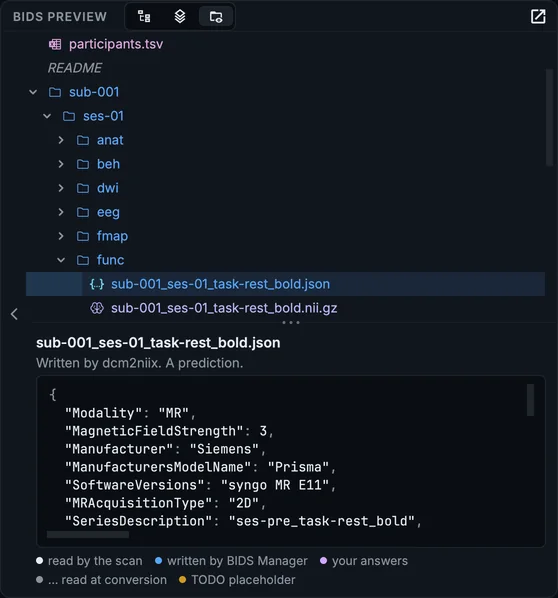
The BIDS preview of the course's sample, with the BOLD run's sidecar selected.
What it lists
Every file the conversion and the metadata step after it will write, named the way each converter names it:
- each recording's data file, and what comes with it: the sidecar, a diffusion run's
.bvaland.bvec, MNE-BIDS'channels.tsv,events.tsvand coordinate files for EEG and MEG, an eye tracker's two files per eye, the physiological recordings of an MRI run, the files you attached to a row; - the
_scans.tsvof each session,dataset_description.json,participants.tsvandparticipants.json; - the companion stubs and
CITATION.cffwhen those settings are on, and asourcedata/copy when that is on.
A file written only in some cases is dim and italic, with the condition: "when the recording has events". A file the conversion will write but that has no valid BIDS name (a piece dcm2niix splits off under its own name) is in the warning colour, with the reason.
What a file will hold
Select a file to see its predicted content. Each value is coloured by where it will come from:
| Colour in the legend | Comes from |
|---|---|
| read by the scan | the header, read when the raw folder was scanned |
| written by BIDS Manager | your settings and the table: a task name, a fieldmap link, a derived time |
| your answers | Dataset metadata, the templates, per-row values in Properties |
| … read at conversion | the converter, reading the data at conversion; the value is not known yet |
| TODO placeholder | the placeholder the Write TODO setting writes |
How it is made
The preview is not a second description of the conversion that could drift from it. Every step that changes what a file holds is the conversion's own function, run on the predicted content: your answers go through the same code that states them into sidecars, the placeholders through the same code that writes them, the dataset description, the participants table and the companion stubs through the functions that write them. What dcm2niix will write is taken from the probe conversions the scan made (Settings > Scan), per kind of file; a value that differs between series of one kind is shown as ….
BIDS Manager's own tests convert the course's multimodal sample with metadata answers set and require every predicted file and value to equal what was written. On 49 sets of DICOM test data from six scanner vendors, 39 were predicted file for file; the others differ only by the pieces dcm2niix splits off under its own names.
What it cannot know
- Values only the data holds, which the converter reads at conversion: shown as
…. - A converter that fails on a series or a recording: the preview shows what it would write if it worked.
- Some pieces dcm2niix splits off under its own suffixes (
_e1,_ph,_real): these are the files where the preview and a conversion can differ. - Edits after the conversion: the preview is of the conversion, not of the dataset as it is now. The Editor shows the dataset as it is.
Use it to check names, folders, what each file will say, and what is still a TODO, before anything is written.