
Learn · Chapter 1 of 15
BIDS in ten minutes
Read a BIDS dataset. By the end of this chapter you can tell what each folder and each part of a file name means, and you know the three words BIDS Manager keeps apart.
What BIDS is
BIDS, the Brain Imaging Data Structure, is a standard for organising and describing neuroimaging data. It fixes three things:
- where each file goes: one folder per participant, optionally one per session, then one per kind of data;
- what each file is called: a name built from labelled parts in a fixed order;
- what each file says about itself: the details of a recording in a JSON file beside it, and tables in a tab-separated format.
A dataset that follows these rules can be read by any tool that knows BIDS (fMRIPrep, QSIPrep, MNE-BIDS-Pipeline, MRIQC and many others) without being told where anything is. The rules are written as a machine-readable schema, published with each version of the standard. BIDS Manager 1.5.0 works to BIDS 1.11.1 by default.
The dataset the course produces
This is the multimodal sample once the course has converted it, as the Editor shows it in chapter 9. Read it from the top down.
multimodal_study/
├── dataset_description.json      the dataset's name, authors, licence, BIDS version
├── README                        what the dataset is, in prose
├── CHANGES                       its history
├── participants.tsv              one row per participant
├── participants.json             what each column of that table means
└── sub-001/                      one participant
    └── ses-01/                   one session (a visit)
        ├── sub-001_ses-01_scans.tsv      every file of the session, with its time
        ├── anat/                 anatomical MRI
        │   ├── sub-001_ses-01_acq-tfl3p2_T1w.nii.gz
        │   └── sub-001_ses-01_acq-tfl3p2_T1w.json
        ├── func/                 functional MRI and the physiology recorded with it
        ├── fmap/                 fieldmaps
        ├── dwi/                  diffusion MRI
        ├── mrs/                  MR spectroscopy
        ├── pet/                  PET
        ├── eeg/                  EEG
        ├── meg/                  MEG
        └── beh/                  behaviour, here the eye tracker
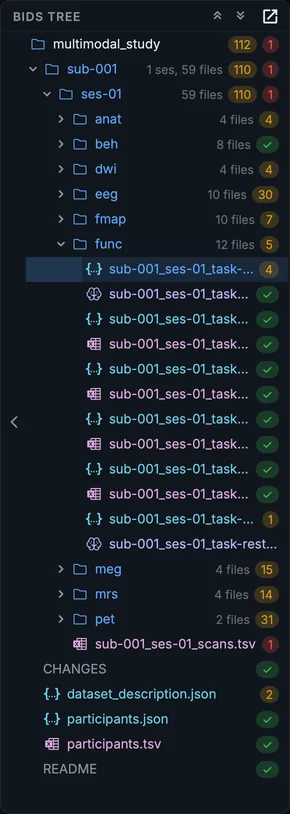
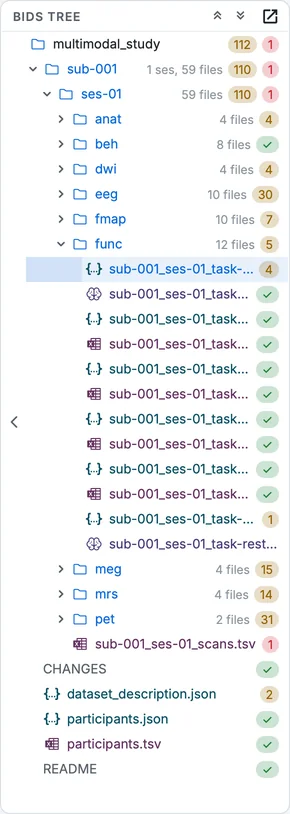
The same dataset in the Editor's tree after conversion. Each folder shows how many files it holds.
Subjects and sessions
Every participant has a folder named sub- and a label: sub-001. A study where participants come more than once has a folder per visit inside it: ses-01, ses-02, or labels that say what the visit was (ses-pre, ses-post). A study with one visit per participant may leave the session level out.
The label after sub- is yours to choose. BIDS asks only that it contains letters and digits; it should never be a name, a birth date or a hospital number.
Datatypes
Inside a subject (or session) folder, files are grouped by datatype, the kind of data:
| Folder | What goes there |
|---|---|
anat |
Anatomical MRI: T1w, T2w, FLAIR, and other structural contrasts |
func |
Functional MRI (BOLD) and the recordings made with it, such as physiology |
dwi |
Diffusion MRI, with its b-values (.bval) and directions (.bvec) |
fmap |
Fieldmaps, used to correct distortions in func and dwi |
perf |
Perfusion MRI (arterial spin labelling) |
mrs |
MR spectroscopy |
pet |
Positron emission tomography |
eeg |
Electroencephalography |
meg |
Magnetoencephalography |
beh |
Behavioural data recorded without brain imaging, including eye tracking |
The end of a file's name, its suffix, says what it is, and so which folder it belongs in. Try a few:
Try it: which folder?
| File | Folder |
|---|---|
sub-01_ses-pre_T1w.nii.gz | anat/ |
sub-01_ | func/ |
sub-01_ | fmap/ |
sub-01_ses-pre_dwi.bval | dwi/ |
sub-01_ | eeg/ |
sub-01_ | pet/ |
sub-01_ses-pre_svs.nii.gz | mrs/ |
File names
A BIDS file name is a sequence of entities, each a key and a value joined by a hyphen, separated by underscores, followed by a suffix and an extension:
sub-001_ses-01_task-rest_bold.nii.gz
└──┬──┘ └─┬──┘ └──┬────┘ └┬─┘└──┬──┘
 subject session  task  suffix extension
The entities always come in the same order, and the standard says which ones each kind of file may carry and which it must carry. A BOLD run must have a task; an anatomical image does not need one, and may have an acq (acquisition) label to tell two T1w scans apart. The most common entities:
| Entity | Key | What it distinguishes |
|---|---|---|
| Subject | sub |
The participant |
| Session | ses |
The visit |
| Task | task |
What the participant was doing |
| Acquisition | acq |
Two acquisitions of the same kind with different parameters |
| Direction | dir |
The phase-encoding direction (fieldmaps, diffusion) |
| Run | run |
Repeats of the same acquisition in one session |
| Recording | recording |
Several signals of one run, such as cardiac and respiratory |
The suffix says what the file is: T1w, bold, dwi, epi, eeg, meg, pet, physio, events, channels. The extension says how it is stored: .nii.gz for images, .edf or .fif for recordings, .tsv for tables, .json for sidecars.
Build a few names yourself. Pick a kind of file, tick the entities you want and give them values: the builder writes them in the standard's order and says when a value breaks the rules. Which entities each kind may carry, and which it must, is read from the BIDS schema.
Try it: build a file name
| Folder | Suffix | Entities it may carry, in order (required in bold) |
|---|---|---|
anat/ | T1w | sub, ses, task, acq, ce, rec, run, echo, part, chunk |
func/ | bold | sub, ses, task, acq, ce, rec, dir, run, echo, part, chunk |
dwi/ | dwi | sub, ses, acq, rec, dir, run, part, chunk |
fmap/ | epi | sub, ses, acq, ce, rec, dir, run, part, chunk |
pet/ | pet | sub, ses, task, trc, rec, run |
mrs/ | svs | sub, ses, task, acq, nuc, voi, rec, run, echo, inv |
eeg/ | eeg | sub, ses, task, acq, run |
meg/ | meg | sub, ses, task, acq, run, proc, split |
Then the other way round: is each of these names valid where it is? Each answer gives the reason, and what BIDS Manager's own schema check says of the name.
Try it: valid or not?
sub-01_ses-pre_T1w.nii.gzinanat/Answer
Valid. Valid: a subject, a session, and the suffix.
sub-01_bold.nii.gzinfunc/Answer
Not valid. A BOLD run must say which task it was. The schema check says: Required entity 'task' missing
sub-01_run-a_T1w.nii.gzinanat/Answer
Not valid. run is an index: a number, not a letter. The schema check says: Entity 'run' value 'a' does not match index pattern /[0-9]+/
sub-01_run-1_task-rest_bold.nii.gzinfunc/Answer
Not valid. Every entity is there, but task must come before run. The schema check says: The entities are not in the standard's order (sub, task, run).
sub-01_acq-mp rage_T1w.nii.gzinanat/Answer
Not valid. A label holds letters and digits only: no space, no underscore, no hyphen. The schema check says: Token 'acq-mp rage' is not a valid 'key-value' BIDS entity
sub-01_task-rest_acq-mb4_bold.nii.gzinfunc/Answer
Valid. Valid: acq tells two kinds of BOLD acquisition apart.
sub-01_task-rest_echo-1_eeg.edfineeg/Answer
Not valid. An EEG recording has no echoes: echo is not allowed there. The schema check says: Entity 'echo' not allowed for eeg/eeg
sub-01_dir-AP_dwi.nii.gzindwi/Answer
Valid. Valid: dir says the phase-encoding direction.
Sidecars and tables
Every data file has a sidecar: a JSON file with the same name and the extension .json. It holds what an analysis needs to know about the recording (the BOLD run's sidecar in the course has 80 fields; four of them are shown here, with the slice times shortened), such as the repetition time of a BOLD run, the sampling frequency of an EEG recording, or the tracer of a PET scan:
{
  "TaskName": "rest",
  "RepetitionTime": 0.85,
  "EchoTime": 0.03,
  "PhaseEncodingDirection": "j-",
  "SliceTiming": [0, 0.3475, 0.6925, 0.2075]
}
The standard declares, for each kind of file, which sidecar fields are required, which are recommended and which are optional. Converters fill most of them from the raw data. Some, such as a task description or the injected mass of a PET tracer, no scanner records: you provide them (chapter 7).
A sidecar does not have to sit beside its file. A sidecar higher up the tree applies to every file below it that matches its name, and a sidecar lower down wins for the fields it repeats: this is the inheritance principle (How values are inherited). Select a run to see which values apply to it, and where each comes from.
Try it: which values apply?
task-rest_bold.json {"TaskName": "rest", "RepetitionTime": 2.0, "EchoTime": 0.03}
sub-01/func/
sub-01_task-rest_bold.json {"RepetitionTime": 2.5}
sub-02/func/
(no sidecar of its own)For sub-01_task-rest_bold.nii.gz:
| Field | Value | From |
|---|---|---|
TaskName | "rest" | the top-level sidecar |
RepetitionTime | 2.5 | its own sidecar (wins) |
EchoTime | 0.03 | the top-level sidecar |
For sub-02_task-rest_bold.nii.gz:
| Field | Value | From |
|---|---|---|
TaskName | "rest" | the top-level sidecar |
RepetitionTime | 2.0 | the top-level sidecar |
EchoTime | 0.03 | the top-level sidecar |
Tables are tab-separated text files (.tsv), each with a JSON file describing its columns: participants.tsv, the events of a task (_events.tsv), the channels of an EEG or MEG recording (_channels.tsv), and the list of files of a session with their acquisition times (_scans.tsv).
Modality, datatype, suffix
Three words that are easy to mix up. BIDS Manager keeps them apart, and the table in chapter 4 has a column for each:
| Word | What it says | Examples |
|---|---|---|
| Modality | How the data was acquired | mri, eeg, meg, pet, eyetrack |
| Datatype | The folder the file goes in | anat, func, dwi, fmap, eeg, pet |
| Suffix | What the recording is | T1w, bold, sbref, magnitude1, eeg, pet |
One MRI session produces files in four datatypes (anat, func, dwi, fmap); one datatype holds files with many suffixes.
How BIDS Manager uses the standard
BIDS Manager reads the schema of the standard and uses it at every stage, not only at the end. When it proposes a name, it builds it from the entities the schema allows for that datatype and suffix, in the schema's order. When you change a value in the table, the name is checked again. The forms in the Editor list the sidecar fields the schema declares for that file, at their level. And validation checks the dataset against the same schema. Learn more in How names are decided.
Your progress is kept in this browser only.